


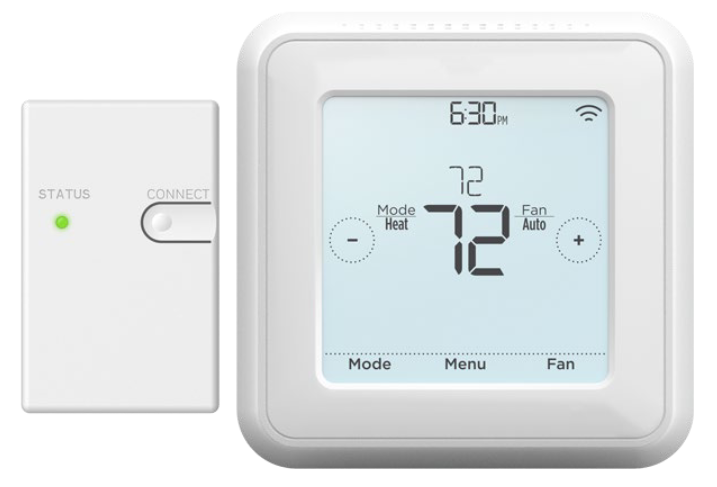


Mitsubishi Wireless Wall Mounted Remote Controller (MHK2)

-
 0% Interest — for orders over $3000
-
 No Credit Needed — Offered at checkout
-
 7 night Luxury Resort Stay — For orders over $3000


What's Included
What's Included
Mitsubishi Wireless Remote Controller
Model Number
MRCH2
Dimensions
4-5/64" W x 1-1/16" D x 4-5/64" H
Documents
Mitsubishi Product Specifications Sheet
Warranty
Parts: 5 years
Mitsubishi Wireless Receiver
Model Number
MIFH2
Dimensions
1-3/4" W x 39/64" D x 3-3/32" H
Documents
Mitsubishi Product Specifications Sheet
Warranty
Parts: 5 years
Mitsubishi Cable For Wireless Receiver
Model Number
MRC2
Length
39-23/64"
Documents
Mitsubishi Product Specifications Sheet
Warranty
Parts: 5 years
Product Details
Product Details
Mitsubishi Wireless Wall Mounted Remote Controller Kit MHK2 Series Overview
MRCH2 Wireless Redlink Remote Controller Specifications
- Touchpanel, Backlit, easy-to-read display
- New RedLINK™ 3.0 wireless technology
- User functions allow user to set:
- - On/Off
- - Operation modes: cool, heat, drying, and fan
- - Set temperature(separate dual set points for heat and cool)
- - Fan speed setting
- - Airflow direction
- Set temperature range limits (dependent on the system connected):
- - Cooling from 50° to 99°F
- - Heating from 40° to 90°F
- - Auto from 50° to 90°F with dual temperature setting
- MHK2 Scheduling options:
- - No Schedule
- - MO-SU = Every day the same
- - MO-FR, SA, SU = 5-1-1schedule
- - MO-FR, SA-SU = 5-2 schedule
- - Each Day = Everyday individual
- - Allow kumo cloud to be schedule holder
- Hold function
- Temporary or Permanent schedule override
- Lockout:
- - On, Off, Mode, FanSpeed, Setpoint, VaneDirection
- Day/Time display with a 12 or 24-hour clock
- Supports both Fahrenheit and Celsius
- RedLINK™ Wireless Connection Status
- Filter sign display
- Diagnostics: Displays and records error codes
- Adjustable auto mode deadband
- Space temperature off set adjustment
- Space humidity off set adjustment
- Hide (on screen only)
- - Indoor temperature, Indoor humidity
- Temperature Sensing Source
- MHK2
- Indoor Unit
- RedLINK Wireless Indoor Air Sensor(IAS)
- Average of MHK2 and RedLINK Wireless Indoor Air Sensor (IAS)
- IndoorHumiditySource
- MHK2
- RedLINK Wireless Indoor Air Sensor (IAS)
- Average of MHK2 and RedLINK Wireless Indoor Air Sensor (IAS)
- Improved indoor unit function code list
- Indoor unit type
- Expanded to 28 indoor unit codes
- Reset to factory default
- Uses two “AA” alkaline batteries (included)
- Dimensions: 4-5/64” H x 4-5/64” W x 1-1/16” D (104x104x27mm)
- Operating Ambient Temperature: 32° to 120° F (0° to 48.9° C)
- Operating Relative Humidity: 5% to 90%
MIFH2 WIRELESS RECEIVER SPECIFICATIONS:
- Included in MHK2 Kit
- Mounts next to or near indoor units to allow MRCH2 Remote Controller operation
- Connects to indoor unit control board with MRC2 Cable
- Dimensions: 3-3/32” H x 1-3/4” W x 39/64” D (74.8 x 44.4 x 15.4 mm)
- Operating Ambient Temperature:-40° to 165°F(-40° to 73.9°C)
- Operating Relative Humidity: 5% to 95%
MRC2 CABLE
- Included in MHK2 Kit in the MIFH2 box
- Connects MIFH2 Wireless Receiver to the CN105 connectoron indoor unit control board
- Length: 39-23/64"(1m)
Specifications Sheets
Specifications Sheets
Product Specification
Warranty Information
Warranty Information
Limited Warranty
Parts
5 years
Note: Labor is not covered under the terms of the manufacturer's warranty.
Under the terms of all manufacturer's warranty and to comply with federal refrigerant handling laws, it is required that the system be checked and started up and signed-off on by a licensed air conditioning/heating contractor prior to use. Please ensure that all supply and return ductwork is properly sized and that the installation is permitted (where required) and conforms with local and state codes. Electrical connections should always be made by a licensed electrical contractor.
Shipping & Returns
Shipping & Returns
Fast nationwide fulfillment from the USA. Free shipping on qualifying orders over $1,500. See our shipping and returns policy for full details.


